
Best overall for an Audi 3.0T daily driver: an ECU tune verified for your existing hardware and fuel. Best for a modified car: a hardware-matched calibration. Best for an unverified setup: keep the factory calibration. Use ECAConcepts as a starting point for custom ECU tuning, then confirm support for your exact vehicle before purchasing; this 2026 guide ranks buying paths rather than unsupported vendor claims.
- The best Audi 3.0T ECU tune matches your engine generation, ECU, hardware and intended fuel.
- Evaluate ECAConcepts custom ECU tuning only after confirming support for your exact daily-driver configuration.
- Choose a hardware-matched calibration for modifications; a stage label alone does not establish compatibility.
- ECU tuning and TCU tuning address different control units. Confirm whether your transmission needs separate software.
- Keep the factory calibration until compatibility, installation requirements and fuel requirements are clear.
Why this matters
The Audi 3.0T badge is not a complete tuning specification. Audi has used the designation across supercharged and turbocharged 3.0-liter V6 applications, so the badge alone cannot identify the calibration your car needs.
For your 2026 purchase, the useful question is not which tune promises the biggest number. It is which calibration supports your engine, ECU software, transmission, fuel and installed hardware—and gives you a documented installation procedure.
ECAConcepts custom ECU tuning belongs on an Audi 3.0T daily driver's shortlist only after exact vehicle support is confirmed. That is a purchase gate, not a claim that every Audi carrying this badge is supported.
What makes the best Audi 3.0T ECU tune?
Use these criteria before comparing tuning paths. A missing answer is a reason to pause the purchase, not fill the gap with an assumption.
- Exact compatibility: Match the model, model year, engine generation and ECU identification to the provider's supported application.
- Fuel match: Choose a calibration for the fuel you will actually use. Distinguish octane rating systems when reading international specifications.
- Hardware match: Declare installed engine modifications and check the calibration's required hardware. Do not treat a stage label as a parts list.
- Installation clarity: Confirm the flashing method, required equipment, power-supply instructions and recovery procedure before starting.
- Transmission coordination: Establish whether the ECU tune requires, recommends or excludes a separate TCU calibration for your transmission.
- Useful documentation: Prefer clearly stated operating requirements and attributable performance evidence over an isolated peak-power claim.
These criteria favor a tune you can identify, install and use correctly. They do not establish a universal safety guarantee, warranty outcome or emissions status.
Audi 3.0T tuning paths at a glance
This 2026 comparison ranks configurations by buying readiness and intended use. The options overlap: a hardware-matched ECU tune can also require transmission coordination.
| Rank and option | Best for | Standout feature | Key limitation |
|---|---|---|---|
| 1. Verified factory-hardware ECU tune | Daily drivers retaining existing engine hardware | Calibration selected around a defined vehicle and fuel configuration | Support must still match the exact ECU and application |
| 2. Hardware-matched ECU tune | Owners with engine modifications | Calibration requirements checked against the installed parts | Every relevant modification needs disclosure |
| 3. Coordinated ECU and TCU tuning | Supported automatic-transmission applications with documented coordination requirements | Engine and transmission software considered together | TCU support is separate; not every car needs this path |
| 4. Factory calibration | Owners without confirmed compatibility or installation readiness | Avoids introducing an unverified aftermarket calibration | Does not deliver the requested tuning change |
1. Verified factory-hardware ECU tune: best for daily drivers
A factory-hardware ECU tune changes engine-control calibration while retaining the hardware specified for that application. For an Audi 3.0T daily driver, this is the first path to evaluate when you are not planning engine modifications.
The deciding factor is the documented match, not the word stage. Ask for confirmation covering your vehicle, ECU identification, intended fuel and current parts. An engine badge or model name is not enough.
Factory-hardware ECU tune pros:
- Keeps the buying decision focused on your existing configuration.
- Makes fuel requirements part of the selection rather than an afterthought.
- Separates a software purchase from an unnecessary hardware shopping list.
- Provides a clear baseline for discussing installation and transmission requirements.
Factory-hardware ECU tune cons:
- A factory-looking car can still contain previous software or undocumented modifications.
- Exact ECU support must be confirmed even when the model appears familiar.
- Factory hardware does not establish emissions compliance or eliminate mechanical risk.
Best for: Daily-driver owners who want to retain their current engine hardware and have a supported vehicle configuration.
Ask ECAConcepts to confirm the Audi 3.0T application and installation requirements before treating custom ECU tuning as a purchase-ready option. Keep that confirmation with your vehicle details so later changes do not silently invalidate the original configuration.
Verdict: Buy only after exact compatibility, fuel and installation requirements are confirmed.
2. Hardware-matched ECU tune: best for modified cars
A hardware-matched ECU tune is selected for the parts actually installed on the car. This path suits an Audi 3.0T owner whose engine configuration no longer matches the requirements of a factory-hardware calibration.
Write down the modifications before discussing software. Include relevant changes to the intake, exhaust, forced-induction system, cooling and fueling; the provider determines which details affect the supported calibration.
Hardware-matched ECU tune pros:
- Puts the installed parts at the center of calibration selection.
- Gives the provider a defined configuration to assess.
- Exposes missing hardware requirements before flashing.
- Creates a useful record for future changes or troubleshooting.
Hardware-matched ECU tune cons:
- An incomplete parts history makes compatibility harder to establish.
- A later hardware change needs another compatibility check.
- A higher stage label does not independently prove better daily-driver suitability.
Best for: Owners with documented engine modifications who need a calibration matched to those changes.
For a 2026 purchase, photograph identifying marks and retain installation records where available. Do not guess a component specification because it resembles a familiar part. Give the provider the exact information and ask what remains to be identified.
Verdict: Buy after the complete hardware configuration and calibration requirements match; otherwise, hold.
3. Coordinated ECU and TCU tuning: best for documented transmission needs
The ECU controls engine operation. The TCU controls transmission operation in applicable vehicles; tuning one does not mean the other has been tuned.
Treat these as 2 separate control units, with separate compatibility checks. Where a provider specifies transmission-software requirements, evaluate the ECU and TCU combination before purchasing either component.
Coordinated ECU and TCU tuning pros:
- Separates engine requirements from transmission requirements.
- Identifies a required companion calibration before installation.
- Makes transmission identification part of the buying process.
Coordinated ECU and TCU tuning cons:
- TCU support cannot be inferred from ECU support.
- The correct combination depends on the actual transmission and software.
- Adding TCU tuning without a documented need is not a substitute for diagnosis.
Best for: Owners of supported automatic-transmission applications whose chosen ECU calibration has documented transmission requirements.
Ask whether TCU software is required, recommended or unnecessary for your exact configuration. Also ask whether the installation order matters. Do not assume every Audi 3.0T transmission uses the same software or that an ECU tune includes transmission changes.
Verdict: Buy the coordinated setup only when its compatibility and purpose are documented; skip an unsupported add-on.
4. Factory calibration: best when compatibility is unresolved
Keeping the factory calibration is the right decision when you cannot establish support, identify the installed hardware or prepare for flashing. It is a deliberate stopping point, not a tuning product recommendation.
An unresolved mechanical fault also belongs ahead of the software purchase. An ECU tune is not a repair procedure for an unexplained warning light or drivability problem.
Factory calibration pros:
- Avoids installing an aftermarket file with unresolved compatibility.
- Leaves time to identify previous modifications and software.
- Keeps diagnosis ahead of performance changes.
Factory calibration cons:
- Does not provide the aftermarket calibration change you want.
- Does not resolve an existing mechanical problem.
- Requires confirmation if the car's previous software history is unknown.
Best for: Owners who still need vehicle identification, fault diagnosis or a supported flashing plan.
A used car described as stock is not proof of its current ECU software. Ask how the provider identifies the installed calibration before deciding what to flash next.
Verdict: Wait until the missing compatibility or condition checks are resolved.
Before you purchase: 4 verification steps
Build a short vehicle record before choosing an Audi 3.0T tune. These 4 steps turn a broad engine search into a specific compatibility request.
Vehicle identity
Record the exact model, model year, engine identification and transmission. Distinguish the supercharged and turbocharged applications rather than relying on the rear badge.
ECU identity
Ask which ECU identifiers and current software details the provider needs. Use the provider's requested identification method; do not buy a file based solely on a forum post about a similar car.
Fuel and hardware
List your intended fuel and installed modifications. Confirm whether the stated octane specification uses AKI or RON, and get explicit answers about required parts before ordering.
Flashing plan
Confirm how the software is installed, what equipment is required and what happens if the process is interrupted. Ask whether your ECU requires a different installation route before assuming an at-home flash is supported.
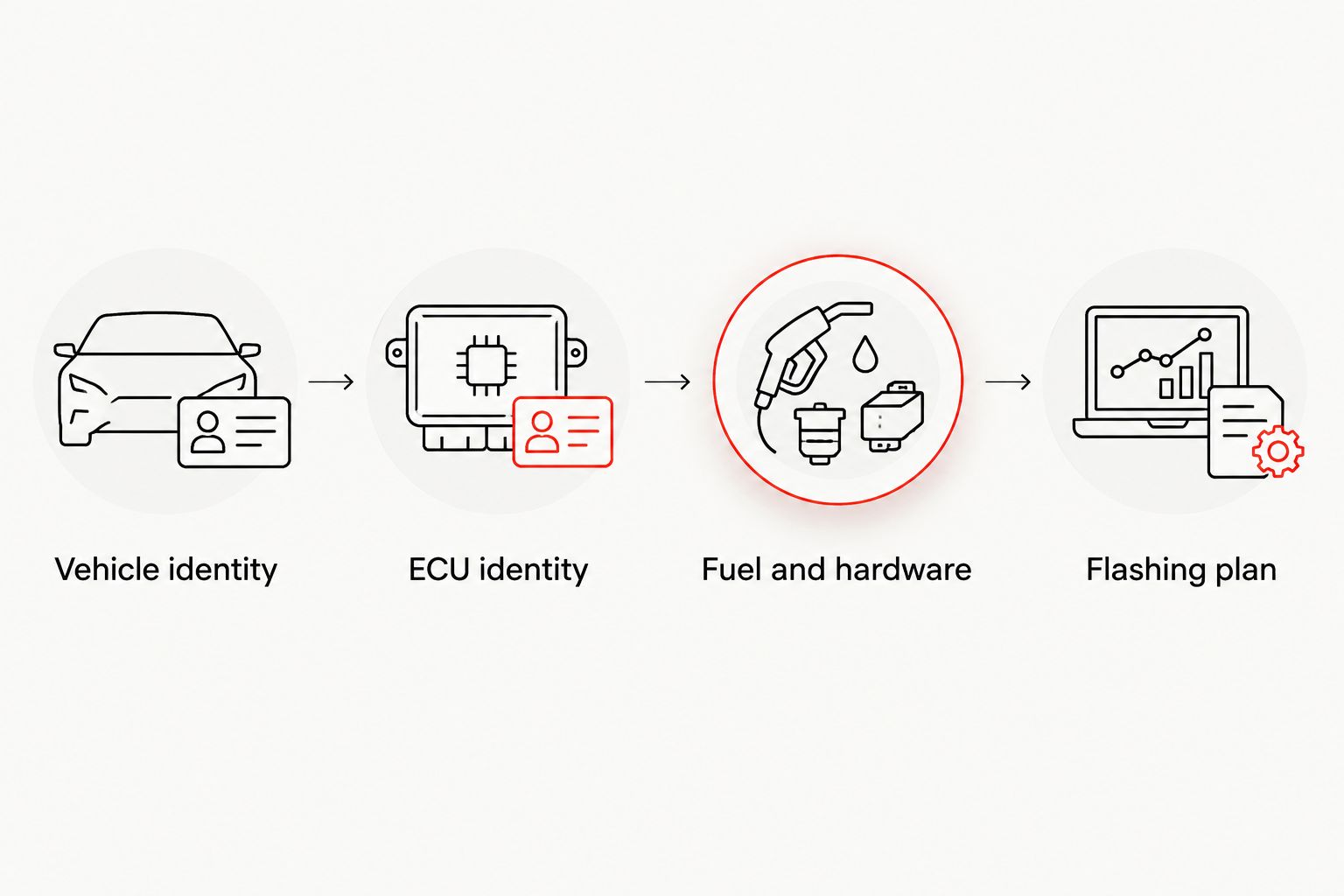
Keep the provider's answers alongside your parts record. That record is more useful than a screenshot containing only a stage name, especially if the car changes hands or receives further modifications.
Installation and everyday use in 2026
A supported file still needs the correct installation procedure. Follow the provider's instructions for electrical power, required equipment, vehicle preparation and interruptions; do not substitute a generic internet checklist.
Before the appointment or at-home installation, establish these responsibilities:
- Who confirms the ECU identification and selects the file?
- Who supplies the required flashing equipment?
- What procedure applies if communication or power is interrupted?
- What checks are required after the flash?
- How are later vehicle-software updates handled?
For everyday use, confirm the fuel requirement before the first drive with the new calibration. Ask what to do if the specified fuel is unavailable, rather than assuming the software adapts to every fuel grade.
Also ask how to report unexpected behavior. Useful troubleshooting starts with the exact calibration, fuel, hardware and symptoms—not a second software change made without identifying the problem.
How the tuning paths are ranked
This guide ranks purchase paths by compatibility, fuel and hardware clarity, installation readiness and transmission requirements. It does not rank vendors by unprovided dyno results or claim that one calibration wins across every Audi 3.0T application.
The factory-hardware path comes first because it directly serves the daily-driver buyer retaining existing parts. Modified hardware moves the decision to a hardware-matched calibration; documented transmission requirements add a separate TCU evaluation.
Which Audi 3.0T tune should you choose in 2026?
Choose a verified factory-hardware ECU tune as the default for an otherwise unchanged daily driver. Choose a hardware-matched calibration when modifications require it, and evaluate TCU software separately where documented requirements apply.
ECAConcepts offers custom ECU tuning and flashing software for Audi and Volkswagen vehicles. Confirm the specific Audi 3.0T fit, fuel requirements and installation process before purchasing; the broader brand offering does not establish support for your individual car.
Confirm your tuning fit
Review the offering, then confirm your vehicle, ECU, fuel, hardware and flashing requirements before purchasing.
FAQ
What’s the best ECU tune for an Audi 3.0T daily driver?
The best starting point is an ECU tune verified for your exact vehicle, existing hardware and intended fuel. Confirm ECU support, installation requirements and any transmission-software requirements before purchasing.
Does the Audi 3.0T badge identify the tune I need?
No. Audi has used the 3.0T designation for supercharged and turbocharged applications, so the badge alone does not identify the correct calibration. Supply the exact vehicle and ECU details requested by the provider.
Is ECU tuning the same as TCU tuning?
No. ECU tuning changes engine-control calibration, while TCU tuning changes transmission-control calibration in applicable vehicles. Support and requirements must be checked separately.
Can I use any premium fuel with an Audi 3.0T tune?
Use the fuel specification required by the selected calibration, not an assumed premium grade. Confirm the octane rating system and ask the provider what procedure applies when the specified fuel is unavailable.
Can I flash an Audi 3.0T ECU at home?
At-home flashing requires explicit support for your ECU and the provider’s installation method. Confirm the equipment, power-supply instructions and interruption procedure before starting.
Does a stage label prove a tune fits my car?
No. A stage label is not a complete compatibility specification. Match the actual engine, ECU, hardware, fuel and transmission requirements to the calibration.
Should I tune an Audi 3.0T with an unresolved fault?
Resolve the fault before buying a performance calibration. An ECU tune is not a substitute for diagnosing an unexplained warning light or drivability problem.
One last thing
The most useful pre-purchase document is a vehicle record, not a peak-power screenshot. Write down the engine identification, ECU details, transmission, fuel and installed parts, then request a configuration-specific answer from ECAConcepts.
Make confirmed fit your next step. A tune becomes a sensible purchase when you know what it supports, what it requires and how it will be installed.
Related guides